Two-way audio in Frigate: making Yi and Tuya cameras talk back
Making the camera talk back: two-way audio in Frigate
Frigate can play sound through a camera's speaker. The talk button in the UI sends your microphone to go2rtc, and go2rtc sends it to the camera over RTSP. This is called two-way talk or the backchannel. It only works when three things line up:
- The camera offers a backchannel in its SDP (its session description).
- The camera firmware actually accepts audio on that channel.
- Your go2rtc config does not turn the backchannel off.
This guide walks through each one, with the commands to run and what the output should look like. It covers Yi cameras running the yi-hack firmware and Tuya cameras exposed through tuya-rtsp-bridge.
About the screenshots. The terminal images below are rendered mock-ups of the real command output, with host addresses blurred. They show the expected shape of each result, not a live capture from a specific camera.
What you need
- SSH access to the camera (yi-hack enables it) or to the bridge host.
- Shell access to the machine running Frigate (Docker).
- The camera's IP address. Replace
CAMERA_IPin every command below.
Step 1: check whether the camera offers a backchannel
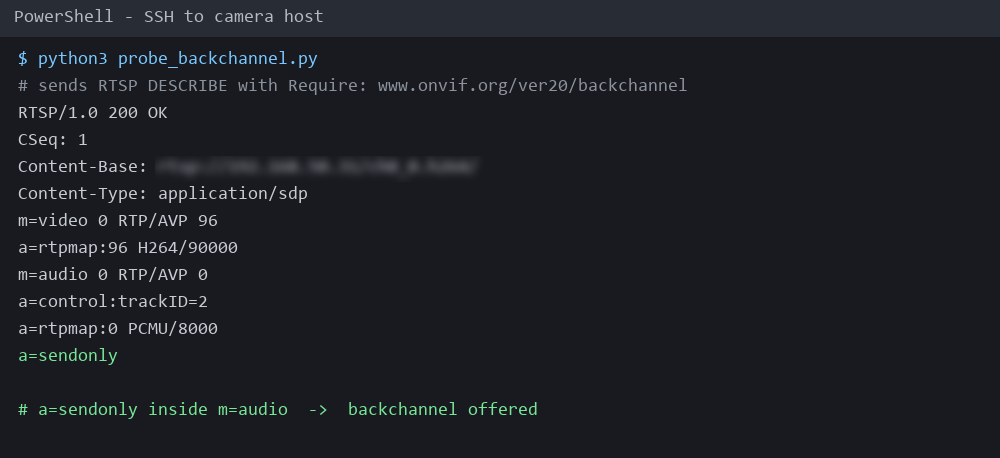
The backchannel is the return audio path, from the phone or PC to the camera. The camera announces it in its SDP. Request the SDP with a raw RTSP DESCRIBE that includes the ONVIF backchannel Require header:
python3 -c "
import socket
s=socket.create_connection(('CAMERA_IP',554),timeout=8)
s.sendall(b'DESCRIBE rtsp://CAMERA_IP/ch0_0.h264 RTSP/1.0\r\nCSeq: 1\r\nAccept: application/sdp\r\nRequire: www.onvif.org/ver20/backchannel\r\n\r\n')
print(s.recv(4000).decode(errors='replace'))"
Read the m=audio block:
a=sendonlyinsidem=audio: the camera offers a backchannel. Continue.- No
sendonlyin the audio block: the camera does not offer one. Nothing in Frigate will fix that. Check the firmware first (Step 2).
Step 2: Yi cameras with yi-hack
2a. Set the required options
Open the config on the camera:
vi /tmp/sd/yi-hack/etc/system.conf
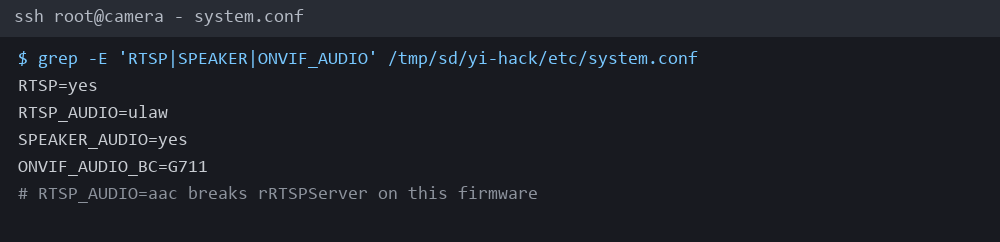
Make sure these four lines are set:
RTSP=yes
RTSP_AUDIO=ulaw
SPEAKER_AUDIO=yes
ONVIF_AUDIO_BC=G711
What each one does:
RTSP=yesstarts the RTSP server.RTSP_AUDIO=ulawis the upstream audio format. Useulaw.aacbreaksrRTSPServeron this firmware.SPEAKER_AUDIO=yescreates the FIFO that carries your audio into the camera.ONVIF_AUDIO_BC=G711advertises the backchannel over ONVIF.
With these set, the startup script launches rRTSPServer with -b ulaw.
2b. Confirm the binary accepts -b
Before changing anything else, check that the installed server understands the flag:
cd /tmp/sd/yi-hack/bin
./rRTSPServer -h 2>&1 | grep -- "-b"
If the binary supports it, you get a line like this:

If you get unrecognized option: b instead, the firmware is too old and the startup scripts (system.sh, wd_rtsp.sh) will never pass the flag:
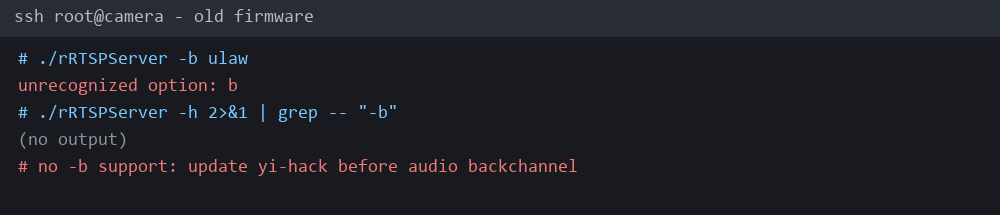
Fix: update yi-hack to a release that ships a newer rRTSPServer. Until then, this camera is listen-only.
2c. Check the running process
ps | grep [r]RTSPServer
The running process must include -b ulaw:

2d. Check the FIFO
The speaker path is a named pipe created at boot when SPEAKER_AUDIO=yes:
ls -l /tmp/audio_in_fifo

If the file is missing, restarting the service does not create it. Reboot the camera (about 80 seconds):
reboot
Step 3: fix the traps on the camera
Trap A: two rRTSPServer instances
An old instance started without -b can keep running next to the new one. Whichever process wins port 554 decides which behavior you get.

Reboot the camera to leave only one instance:
reboot
Then repeat ps | grep [r]RTSPServer and confirm one line with -b ulaw.
Step 4: go2rtc and Frigate
In Frigate's config.yaml, the stream URL must not end with #backchannel=0. That flag turns the return channel off even when the camera offers it.
go2rtc:
  streams:
    yi_camera_a:
      - rtsp://CAMERA_IP/ch0_0.h264#tcp
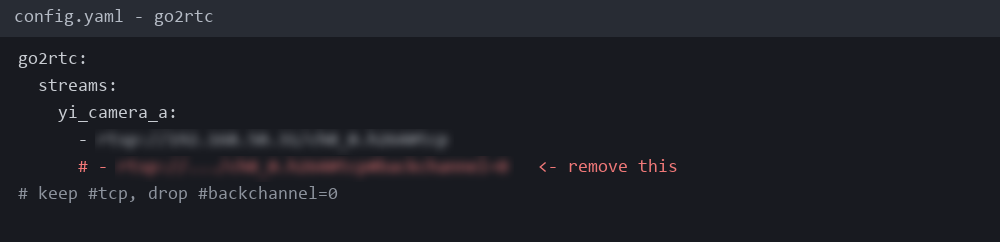
Find the line that contains #backchannel=0 (old configs often have it) and delete that part:
grep -n "backchannel=0" /path/to/frigate/config/config.yaml
No output means the flag is gone.
Then restart Frigate. go2rtc negotiates the SDP when it connects and does not always reread it:
docker restart frigate
Confirm the negotiation in the logs:
docker logs frigate 2>&1 | grep -i backchannel
A line with backchannel=ok means the talk button can send audio:

Step 5: Tuya cameras through tuya-rtsp-bridge
Tuya cameras bridged this way announce the backchannel natively. Run Step 1 to confirm a=sendonly inside m=audio. If it is there, you only need to avoid #backchannel=0 in their go2rtc URLs. No yi-hack steps apply to them.
Current status
| Camera | Backchannel in SDP | What was done |
|---|---|---|
| Yi A | Yes | #backchannel=0 removed; -b ulaw active |
| Yi B | Yes | #backchannel=0 removed; -b ulaw active |
| Yi C | No | Old rRTSPServer without -b. Needs a yi-hack update |
| Tuya A / Tuya B | Yes | Announced natively; no #backchannel=0 |
Not tested yet: speaking through the camera from Frigate end to end. The SDP negotiation is verified; the audio itself is not.
Limits
- HTTPS required. The browser microphone needs a secure context. If Frigate is served over plain HTTP, the talk button cannot capture audio.
- Old yi-hack firmware has no backchannel. Without
-b, update yi-hack or accept that the camera is listen-only.
Quick checklist
DESCRIBEreturnsa=sendonlyinm=audio.system.confhas the four yi-hack options (Yi only).rRTSPServer -hlists-b(Yi only).psshows onerRTSPServer -b ulaw./tmp/audio_in_fifoexists.- go2rtc URL has no
#backchannel=0. docker logs frigateshowsbackchannel=ok.- Frigate is served over HTTPS.